Supabase Backup Retention: How Long Are Backups Kept?
How long does Supabase keep your database backups?
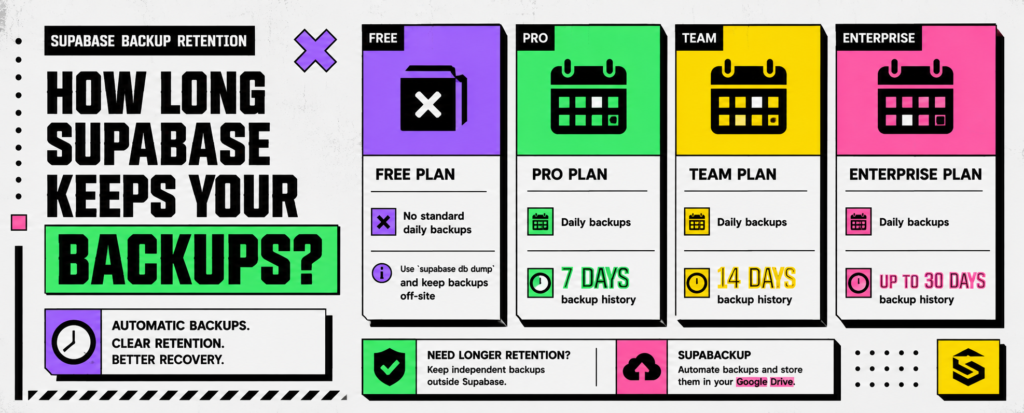
As of 2026, Supabase’s standard daily backup retention depends on your plan:
| Supabase Plan | Automatic Daily Backups | Backup History |
|---|---|---|
| Free | No standard daily backup history | — |
| Pro | Yes | 7 days |
| Team | Yes | 14 days |
| Enterprise | Yes | Up to 30 days |
Supabase automatically provides daily backups for Pro, Team, and Enterprise projects. Free Plan users should regularly create database exports and keep copies outside the platform.
The important detail is that backup retention is limited. A seven-day history does not mean your database is protected indefinitely. As new backups are created, older recovery points eventually fall outside the available retention window.
This guide explains how Supabase backup retention works, how PITR changes recovery options, and when keeping an independent backup makes sense.
What Does Backup Retention Mean?
Backup retention is simply how long a backup remains available for recovery.
For example, suppose your Supabase Pro project creates one backup each day and keeps seven days of backup history.
Monday     ✓
Tuesday    ✓
Wednesday  ✓
Thursday   ✓
Friday     ✓
Saturday   ✓
Sunday     ✓
As new backups are created, older recovery points eventually fall outside that seven-day window.
This is why backup frequency and backup retention are different:
- Backup frequency: How often a backup is created.
- Backup retention: How long those recovery points remain available.
A database backed up every day but retained for only seven days gives you very different recovery options from daily backups kept for several months.
Supabase Pro Backup Retention
Supabase Pro projects currently provide 7 days of daily backup history.
That can be useful when recovering from recent issues such as:
- an incorrect database migration
- accidental data deletion
- application bugs that modify records
- a bad data import
- developer mistakes
- recent database corruption
For example, if something goes wrong on Wednesday and you discover it on Friday, a clean backup may still be available.
The limitation appears when problems remain unnoticed for longer.
If a bug started damaging records three weeks ago, every backup remaining inside a seven-day retention window may already contain the same problem.
So the right retention period depends partly on how quickly you are likely to discover an issue.
Supabase Team Backup Retention
Supabase Team projects currently provide 14 days of daily backup history.
That gives teams a longer investigation and recovery window.
For example:
Day 1   → Bug introduced
Day 4   → Incorrect data starts accumulating
Day 10  → Customer reports the problem
Day 11  → Engineering investigates
With only seven days of history, the clean recovery point may already be unavailable.
With fourteen days, you may still have useful recovery options.
This does not mean every Team project needs to restore an older backup. It simply gives teams more time to identify and recover from problems that are not immediately discovered.
Supabase Enterprise Backup Retention
Supabase Enterprise projects can access up to 30 days of daily backup history.
Longer retention can be useful when:
- database problems may remain unnoticed for weeks
- applications contain important business data
- multiple teams modify production systems
- recovery requirements are stricter
- customers depend heavily on historical data
However, even 30 days is still a defined retention period.
If you need database copies from six months or one year ago, native daily backup retention is not designed to act as long-term archival storage.
You will need a separate retention strategy.
Does Supabase Free Include Automatic Daily Backups?
Free Plan projects do not receive the same standard automatic daily backup history available on paid projects. Supabase recommends periodically exporting the database and maintaining copies outside the platform.
A common approach is:
Supabase Database
       ↓
Logical Database Backup
       ↓
Off-Site Storage
For a disposable test project, this may not matter much.
Once real users and important data are involved, however, relying on a database without an independent backup becomes increasingly risky.
If you are currently using the Free Plan, see our complete guide on how to back up a Supabase Free Plan project.
What Happens When a Supabase Backup Expires?
Once a backup falls outside the available retention window, you should not expect it to remain available as a normal recovery point.
For example, with seven days of history:
Today
 ↓
Day -1 ✓
Day -2 ✓
Day -3 ✓
Day -4 ✓
Day -5 ✓
Day -6 ✓
Day -7 ✓

Older backup → outside normal retention
That is why native backup history should be viewed primarily as a recent recovery mechanism, not permanent archival storage.
If you need older database snapshots for disaster recovery, auditing, migrations, or historical reference, maintain separate backups with your own retention policy.
What About Supabase Point-in-Time Recovery?
Point-in-Time Recovery, or PITR, provides a more precise recovery mechanism than standard daily backups.
Instead of restoring only from daily snapshots, PITR lets you choose a specific recovery point within the available recovery window.
Supabase currently offers PITR windows of:
| PITR Recovery Window | Approximate Monthly Price |
|---|---|
| 7 days | ~$100 |
| 14 days | ~$200 |
| 28 days | ~$400 |
These charges are per project and are additional to the underlying Supabase plan and applicable compute costs.
PITR becomes particularly useful when losing even several hours of production data would be costly.
For example:
09:00  Normal activity
11:42  Destructive query runs
11:44  Problem discovered
A daily backup might require restoring to the previous day’s snapshot.
PITR may let you recover to a point immediately before the destructive event, as long as that point is still inside your configured recovery window.
For a detailed cost breakdown, read our Supabase PITR Pricing guide.
Daily Backups vs PITR
These are related recovery tools, but they are not the same.
| Feature | Daily Backups | PITR |
|---|---|---|
| Recovery points | Daily snapshots | Fine-grained points in time |
| Pro retention | 7 days | Configurable |
| Team retention | 14 days | Configurable |
| Enterprise retention | Up to 30 days | Configurable |
| Best for | General recovery | Precise production recovery |
| Additional PITR charge | No | Yes |
Daily backups may be sufficient for smaller applications where losing part of a day’s data is acceptable.
For a high-activity production system where even a few hours of lost transactions would be serious, PITR may be the better recovery option.
If you’re deciding between the two approaches, see our full Supabase PITR vs Daily Backups comparison.
Does Deleting a Supabase Project Keep Its Backups?
No.
This is an important limitation.
Deleting a Supabase project permanently removes its associated data and backups. The normal 7-, 14-, or 30-day retention periods do not mean those backups remain available after the project itself has been permanently deleted.
In other words:
Delete project
      ↓
Project and associated backups removed
If accidental project deletion is part of your risk model, keeping an independent backup outside the project becomes much more valuable.
Native Retention vs Independent Backup Retention
Supabase’s native backup system answers:
How far back can I recover this active Supabase project?
An independent backup answers:
How long do I want to keep separate copies of my database?
Those are different questions.
For example:
Supabase Pro
Native recovery history: 7 days

Independent backups
Daily copies: 30 days
Monthly archive: longer if needed
There is nothing inherently wrong with seven days of native retention.
The question is whether that window matches your application’s recovery requirements.
How Much Backup History Do You Need?
There is no universal number.
Three questions are especially useful.
How quickly would you notice a problem?
If database errors are usually detected within hours, shorter retention may be enough.
If corrupted or incorrect data could remain unnoticed for several weeks, longer retention becomes much more valuable.
How valuable is the data?
A personal test project and a production SaaS application containing customer records do not have the same recovery requirements.
As the importance of your application grows, your backup strategy should usually grow with it.
How much data can you afford to lose?
This is closely related to your Recovery Point Objective (RPO).
If losing up to one day of data is acceptable, daily backups may be sufficient.
If losing even one hour of transactions would cause significant problems, investigate more frequent recovery options such as PITR.
Should You Keep an Independent Supabase Backup?
For important projects, an independent backup can provide a useful additional recovery layer.
A simple architecture might look like:
              Supabase Database
                     │
           ┌─────────┴─────────┐
           ↓                   ↓
    Native Backups      Independent Backup
           ↓                   ↓
    Supabase Restore       Off-Site Copy
The goal is not necessarily to replace Supabase’s native backup system.
It is to avoid having every recovery scenario depend on the same platform and retention policy.
If you need to restore a logical backup into another project, see our guide on how to restore a Supabase backup to a new project.
Extending Backup Retention With SupaBackup
If you want independent Supabase database backups without maintaining your own scheduled scripts, SupaBackup can automatically save database backups directly to your connected Google Drive.
The current Pro plan supports:
- daily backups
- up to 3 backup jobs
- keeping the latest 7 backups
- keeping the latest 14 backups
- keeping the latest 30 backups
- or keeping all generated backups by disabling automatic deletion
The backup files are stored in the Google Drive account you connect rather than being permanently stored by SupaBackup.
With daily backups:
Latest 7 backups  ≈ about one week
Latest 14 backups ≈ about two weeks
Latest 30 backups ≈ about one month
If you choose to keep everything, your actual retention depends on how long you retain those files in Google Drive.
Want independent Supabase backups without maintaining your own backup scripts? SupaBackup can automatically send scheduled database backups directly to your Google Drive.
Start Backing Up Supabase →
Supabase Retention vs SupaBackup Retention
The two systems solve different problems.
| Feature | Supabase Native Backups | SupaBackup |
|---|---|---|
| Primary purpose | Managed recovery | Independent off-site copy |
| Backup destination | Supabase infrastructure | Your Google Drive |
| Pro history | 7 days | Not tied to Supabase Pro retention |
| Team history | 14 days | Not tied to Supabase Team retention |
| Retention control | Plan-dependent | Latest 7, 14, 30, or keep all on Pro |
| Project deletion protection | Associated backups are removed | Existing Drive copies remain separate |
| Best used as | Primary managed recovery | Additional backup layer |
You do not necessarily need to choose one or the other.
For production applications, native recovery combined with an independent backup can provide more flexibility.
A Simple Supabase Backup Retention Strategy
For a small production Supabase application, a practical starting point could be:
Supabase native backups
        +
Daily independent backups
        +
Keep 14–30 recent copies
        +
Backup before major migrations
        +
Occasional restore testing
This is not a universal requirement.
A low-risk side project may need much less, while a business-critical system may require PITR, longer archival retention, monitoring, and a formal disaster-recovery plan.
For a broader approach, see our Supabase Backup Best Practices guide.
Final Takeaway
Supabase currently provides 7 days of daily backup history on Pro, 14 days on Team, and up to 30 days on Enterprise.
Those backups are useful for recent managed recovery, but they are not permanent archives.
If you need longer history, an independent copy, or protection against scenarios such as permanent project deletion, maintain an off-site backup strategy.
SupaBackup can automate that additional layer by saving scheduled Supabase database backups directly to your Google Drive.