Does Supabase pg_dump Count as Egress? Backup Costs Explained
Yes. When pg_dump runs on a machine outside Supabase and downloads data from your hosted Postgres database, the transferred data counts toward your Supabase egress usage.
Supabase defines database egress as data sent from the database to a client. PostgreSQL describes pg_dump as a client application that can connect from a remote host. Put those two facts together: a remote dump reads database content and transfers it out of Supabase, so it is egress. Depending on the connection method, the dashboard may categorize it as Database Egress or Shared Pooler Egress, but it still contributes to the organization’s unified egress quota.
The good news is that a backup does not automatically create an extra charge. Supabase includes a monthly egress allowance with each plan. You pay an overage only when your organization exceeds the included quota and its billing settings allow paid over-usage.
This guide explains what gets counted, how to estimate the real cost of scheduled backups, why dump-file size can be misleading, and how to keep backup traffic under control.
The short answer
| Question | Answer |
|---|---|
Does a remote pg_dump count as Supabase egress? | Yes. Database data is sent from Supabase to the machine running the dump. |
| Is every dump charged separately? | No. The traffic first uses the monthly egress included with your organization’s plan. |
| Is it cached egress? | No. A database dump is not served from Supabase’s Storage CDN cache. |
| Does uploading the finished dump to Google Drive count again at Supabase? | No. That upload leaves your backup machine or service, not Supabase. The download from Supabase is the relevant Supabase egress event. |
Does pg_dump include files in Supabase Storage buckets? | No. A database backup contains Storage metadata, not the actual objects stored through the Storage API. |
Why pg_dump creates Supabase egress
pg_dump is a PostgreSQL client utility. It connects to your database, reads the selected schemas and tables, and writes a logical representation to a local file or standard output. The tool may run on your laptop, a VPS, a CI runner, or a managed backup service.
If that machine is outside Supabase, the database must send the exported information over the network. Supabase’s egress documentation defines Database Egress as data sent to a client when retrieving information stored in the database. PostgreSQL’s SQL dump documentation confirms that pg_dump is a regular client application and can be run from a remote host.
The route usually looks like this:
pg_dumpconnects to the Supabase Postgres endpoint.- Supabase reads the requested schema and table data.
- The database sends that information to the client running
pg_dump. - The client writes, compresses, or streams the dump to its destination.
Step 3 is the Supabase egress event.
Supabase recommends a direct database connection for native Postgres tools such as pg_dump, migrations, and backup-and-restore tasks. If you use the shared Supavisor pooler instead, the usage may appear as Shared Pooler Egress. Supabase says it does not also count Database Egress for that same pooler transfer, which prevents double counting. Both categories still draw from the unified egress allowance.
Current Supabase egress pricing
As of September 2026, Supabase lists the following uncached egress allowances and rates:
| Plan | Included uncached egress | Overage rate |
|---|---|---|
| Free | 5 GB per organization per billing cycle | No paid overage; continued excess can lead to restrictions |
| Pro | 250 GB per organization per billing cycle | $0.09 per GB above the quota when over-usage is enabled |
| Team | 250 GB per organization per billing cycle | $0.09 per GB above the quota |
| Enterprise | Custom | Custom |
These figures come from the current Supabase pricing page and egress usage guide. Pricing can change, so check those pages before making a long-term cost projection.
Two billing details are easy to miss:
- The allowance belongs to the organization, not to each project. Traffic from every project and supported service is combined.
- The quota is unified. Database queries, Storage downloads, Auth, Realtime, Edge Functions, Supavisor, and other uncached traffic can consume the same allowance.
For example, a Pro organization with 180 GB of application traffic has only about 70 GB of its 250 GB uncached egress allowance left for database backups and other services during that billing cycle.
How to estimate pg_dump backup costs
A useful first estimate is:
monthly backup egress ≈ transfer per full dump × backups per month
Then estimate any paid overage:
estimated egress overage = max(0, total organization egress − included quota) × overage rate
The important phrase is total organization egress. Backup traffic does not receive its own separate free allowance.
Example 1: A 5 GB daily backup on Pro
Assume each full backup transfers approximately 5 GB and runs 30 times per month:
5 GB × 30 = 150 GB of monthly backup egress
If the organization produces another 40 GB of uncached egress, the estimated total is 190 GB. That remains below the 250 GB Pro allowance, so the estimated egress overage is $0.
Example 2: A 20 GB daily backup on Pro
20 GB × 30 = 600 GB of monthly backup egress
If backup traffic were the organization’s only egress, the estimated overage would be:
(600 GB − 250 GB) × $0.09 = $31.50
Real application traffic would increase that amount. Taxes, plan fees, compute, disk, storage, and other billable usage are separate from this estimate.
Example 3: A 20 GB weekly backup on Pro
Using 4.3 weeks as an average month:
20 GB × 4.3 ≈ 86 GB of monthly backup egress
That schedule uses far less bandwidth than daily full dumps. Whether weekly recovery points are acceptable depends on how much data your business can afford to lose between backups.
Why the dump file size may not equal metered egress
It is tempting to look at a 4 GB compressed backup file and assume the dump used exactly 4 GB of Supabase egress. That is not a safe assumption.
PostgreSQL supports compressed archive output for pg_dump, but the utility runs on the client. In many backup pipelines, database rows travel to the client before the client compresses the archive. Compression can substantially reduce the final file size and the bandwidth required to upload that file to Google Drive, S3, or another destination, yet the transfer recorded at the source database may be larger.
The opposite mismatch can also occur. A database’s provisioned disk size includes indexes, free space, internal structures, and other data that may not appear in the same form in a logical dump. A 20 GB database disk therefore does not guarantee a 20 GB logical transfer.
Treat these as three different measurements:
| Measurement | What it tells you |
|---|---|
| Database or disk size | Space used or provisioned inside Supabase |
Network transfer during pg_dump | The figure most relevant to Supabase egress |
| Final compressed dump size | Storage required at the backup destination |
For reliable forecasting, run a representative backup and compare the change in the Supabase organization’s Egress usage. Use several runs if the database changes significantly from day to day.
Does supabase db dump also count as egress?
Yes, when it exports a linked or remote Supabase database to a machine outside the platform.
Supabase documents that supabase db dump uses pg_dump under the hood while applying Supabase-specific filtering. The CLI excludes internal schemas, strips reserved roles, and makes other changes intended to produce a more portable restore. It is often safer than running a raw, unrestricted pg_dump against a Supabase project, but it still needs to read and transfer the selected database data.
The CLI wrapper changes what is included in the logical dump; it does not turn a remote export into an egress-free operation. See Supabase’s backup and restore guide for the supported workflow.
What a database dump does not back up
A successful pg_dump is not necessarily a complete backup of everything in a Supabase project.
According to Supabase’s database backup documentation, database backups do not include the objects stored through the Storage API. Postgres holds metadata about those files, but not the actual file bytes. Downloading Storage objects separately creates Storage Egress and adds to the same uncached egress quota.
You should separately account for:
- Files inside Supabase Storage buckets
- Edge Function source and deployment configuration
- Auth provider settings, API keys, and secrets
- Realtime and project-level settings that are not stored in the dump
- Restore testing and documentation
This distinction matters for both recovery planning and cost estimates. A 10 GB Postgres dump plus 200 GB of Storage objects is not a 10 GB project backup.
Seven ways to reduce Supabase backup egress safely
Reducing backup bandwidth should never mean creating backups that cannot recover your application. Start with recovery requirements, then remove avoidable transfer.
1. Choose backup frequency from your recovery point objective
Your recovery point objective, or RPO, is the maximum amount of recent data you can accept losing. If the business can tolerate up to 24 hours, one verified daily backup may be enough. Running the same full export every hour would multiply egress without delivering necessary value.
2. Exclude data that is genuinely reproducible
Large cache tables, temporary imports, derived analytics, job history, or test fixtures may not need to be in every long-term backup. pg_dump supports schema and table filters, and the Supabase CLI exposes relevant include and exclude options.
Document every exclusion. A smaller bill is not useful if a critical table is missing during a restore.
3. Avoid accidental duplicate jobs
Duplicate cron entries, overlapping CI workflows, retries without locking, and two backup products running simultaneously can quietly double or triple monthly traffic. Give each scheduled run a unique record and prevent another full dump from starting while one is active.
4. Separate full backups from higher-frequency recovery
For larger production databases, repeated logical full dumps may become inefficient. A combination of less frequent portable logical backups and platform-native recovery features may better match the required recovery point and recovery time. Evaluate Supabase’s managed backups and Point-in-Time Recovery against your size, risk, and budget.
5. Schedule and monitor large exports
Backups add read load as well as bandwidth. Run large dumps during quieter periods when possible, watch database performance, and confirm that each job finishes before the next begins. A failed job that repeatedly restarts can still consume egress.
6. Compress and stream after extraction
Compression should not be treated as a guaranteed reduction in the source-side database transfer, but it remains valuable. It reduces destination storage, can reduce the second network leg, and avoids requiring disk space equal to the uncompressed dump.
A streaming pipeline is especially useful when the database is larger than the backup server’s free disk space. Data can flow from pg_dump through compression and encryption directly to remote storage instead of creating a large temporary file.
7. Track the organization-level quota
Open the Supabase organization’s Usage page and monitor Total Egress throughout the billing cycle. Filter by project when investigating a spike. Supabase notes that usage already served cannot be reduced retroactively; optimization affects future traffic.
Also review the Spend Cap. On Pro, egress is covered by the Spend Cap. With the cap enabled, exceeding the allowance can lead to restrictions rather than an overage bill. With it disabled, supported over-usage continues at the published rate. Supabase explains these behaviors in its cost-control guide.
A cost-aware backup architecture
A practical off-site backup flow is:
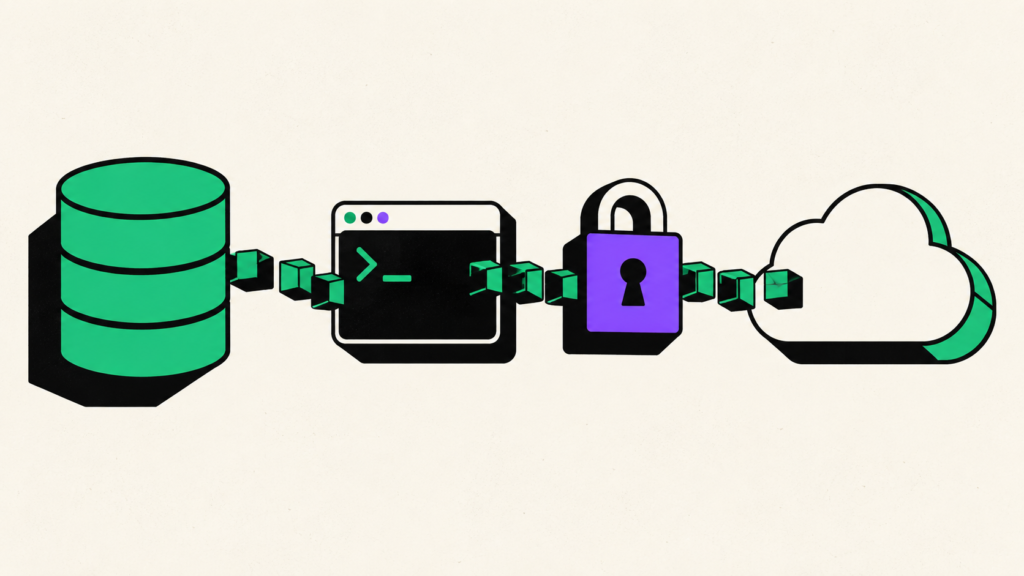
Supabase Postgres → pg_dump → compression → encryption → customer-controlled cloud storage
This design has two separate network legs:
- Supabase to the backup process: counts as Supabase database or shared-pooler egress.
- Backup process to the storage provider: does not count as a second Supabase transfer, although the backup host or destination provider may apply its own limits or charges.
Streaming is useful because it can avoid storing a full unencrypted dump on an intermediary server. Encryption should happen before the backup reaches destination storage, and restore credentials should be protected separately from the archive.
SupaBackup is designed around this model: it creates scheduled Supabase database backups, encrypts the stream, and sends the result to the customer’s own Google Drive. The backup still uses Supabase egress—the source platform must send the database data—but automation makes the schedule, destination, and retention easier to manage without treating the backup provider as permanent storage.
How to check your actual backup usage
Use this simple measurement process instead of relying only on database or archive size:
- Open the Supabase Dashboard and go to your organization’s Usage page.
- Record Total Egress and, if available, the database or shared-pooler breakdown.
- Make sure no other major export or traffic spike is running.
- Run one representative backup.
- After usage reporting updates, record the new value.
- Repeat on another day and use the average change for forecasting.
- Multiply the average by the planned number of monthly runs, then add normal application egress.
Usage dashboards may not update instantly, and a busy production application makes perfect isolation difficult. For a high-stakes estimate, compare multiple similar time windows and leave headroom for growth.
Key takeaways
- A remote
pg_dumporsupabase db dumptransfers database data out of Supabase and therefore uses egress. - The traffic consumes the organization’s unified uncached egress quota; it may appear as Database Egress or Shared Pooler Egress.
- Included quota is used before paid overage applies. Pro and Team currently include 250 GB of uncached egress, with eligible over-usage priced at $0.09 per GB.
- A compressed dump’s file size is not a reliable measurement of source-side network transfer.
- Supabase Storage files require a separate backup and create their own egress when downloaded.
- The safest savings come from removing duplicate jobs, choosing an RPO-based schedule, excluding only reproducible data, streaming securely, and monitoring real usage.
Plan backup frequency with egress in mind
pg_dump is portable, familiar, and useful, but it is still a full client-side read of the data you export. For small databases, the transfer may fit comfortably within the included quota. For larger databases or daily schedules, backup traffic can become one of the organization’s largest egress sources.
Estimate the transfer, include normal application traffic, watch the actual Usage page, and test your restores. If you want encrypted scheduled backups delivered to a Google Drive account you control, start with SupaBackup and choose a frequency that matches both your recovery needs and your Supabase egress budget.